GuideProposition Studio
Get started with Proposition Studio.
From a new account to your first versions, in eight short steps.
- Create an account.Sign up with Google or with your email address. If you use email, confirm it with the link we send you.
- Use your 3 free credits.You start with 3 free credits. No card required.
- Create a project.One project per room, house or client keeps your sources, versions and references together.
- Upload an image.A photo of your room or a screenshot of your 3D model. JPG, PNG or WebP, up to 10 MB.
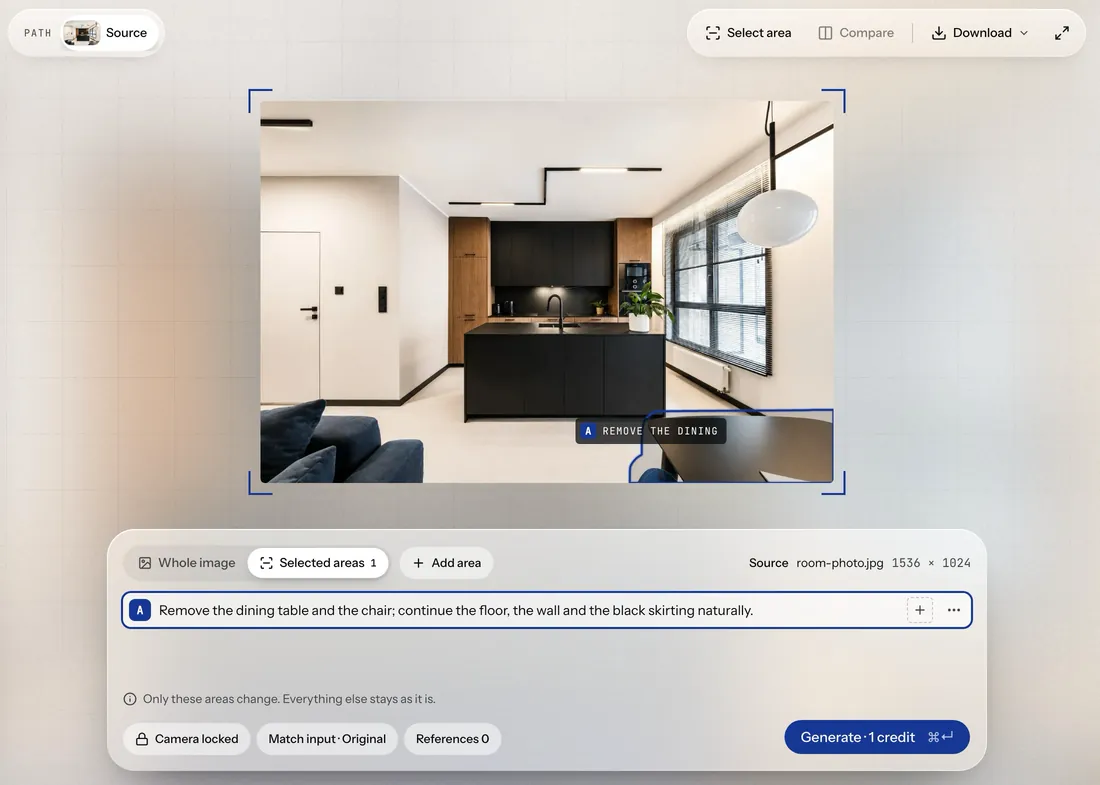
- Mark an area and describe the change.Paint over what should change and say in one sentence what you want there. You can also describe the whole image instead, for example to change the light or the season.
- Generate.One generation costs 1 credit. A failed generation does not use a credit.
- Compare versions.Every result stays in the project as a version. Compare it with the source or with another version, and keep going from the one you like.
- Buy credits when you need them.One-time credit packs, no subscription. Paid credits are valid for 12 months from purchase.
Do I need a card to start?
No. You start with 3 free credits and no card.
What can I upload?
A photo of a room, a screenshot of a 3D model, a render or a sketch. JPG, PNG or WebP, up to 10 MB.
How much does it cost?
You start with 3 free credits, no card required. One generation costs 1 credit. After that you buy a one-time credit pack when you need it. There is no subscription.
What if there are no free seats?
When there are no free seats, join the waiting list. We will email you when a seat opens.
StartAccess
Open your first project.
Sign up, upload an image and make your first version. You start with 3 free credits, no card required.